How to Download Malir Cantonment Board Bill Online? | CB Care App Guide

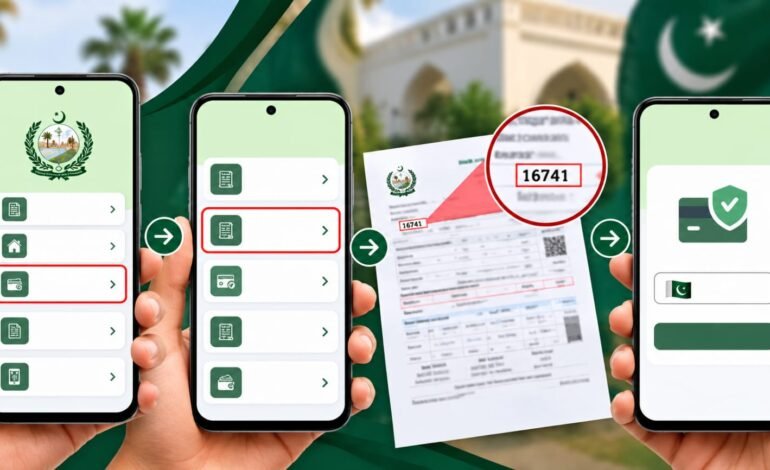
If you have not received your Malir Cantonment Board bill in printed form, you can use the CB Care app to access and download your updated bill online.
The process requires your Revenue ID, which can usually be found on your previous Malir Cantonment Board bill. Follow the steps below to get your latest bill.
Step 1: Open the CB Care App
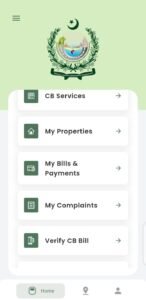
Open the CB Care application on your smartphone.
From the home screen, select “My Bills & Payments.”
Step 2: Select “Download & Pay by Revenue ID”
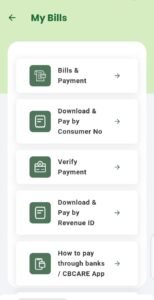
After opening the My Bills section, look for the option:
“Download & Pay by Revenue ID”
Tap this option to continue.
Step 3: Find Your Revenue ID
To complete the process, you need your Revenue ID.
Take your old or previous Malir Cantonment Board bill and look for the Revenue ID. It is generally located:
- At the end of your postal address
- Above your name
- Usually as a 6-digit number
- It will generally start with 16
Keep this Revenue ID ready for the next step.
Step 4: Enter Your Revenue ID and Submit
Return to the CB Care app and enter your Revenue ID in the required field.
After entering the Revenue ID, tap “Submit.”
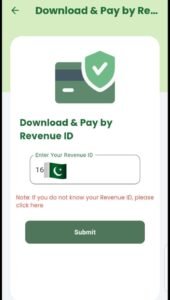
The app will provide you with the updated bill, which you can view and download as a soft copy.
Why Keep Your Previous Bill?
Your previous bill can be useful because it contains your Revenue ID, which is required to access the bill through the Revenue ID option in the CB Care app.
If you have not received your latest printed bill, having an old bill available can make the process easier.
Quick Steps
CB Care App → My Bills & Payments → Download & Pay by Revenue ID → Enter Revenue ID → Submit → View/Download Updated Bill
This provides a convenient way to access your Malir Cantonment Board bill digitally when you do not have the printed copy.
Important Note
The Revenue ID details and process described above are based on the CB Care app screens and bill information shown in this guide. App options or procedures may change with future updates.